
How to define Users Security Levels and permissions
Last Updated:
Key Takeaways
- Role-Based Access Control (RBAC): Essential for delegating tasks without compromising sensitive business data.
- Internal Fraud Prevention: Statistics show that 85% of internal fraud is committed by employees with excessive system permissions.
- Administrative Efficiency: User Groups in SofTech allow for "one-click" permission management for entire departments.
- Data Confidentiality: Separating "Sales" access from "Financial" reporting ensures cashiers remain focused and data remains private.
How to Define User Security Levels and Permissions in Your ERP
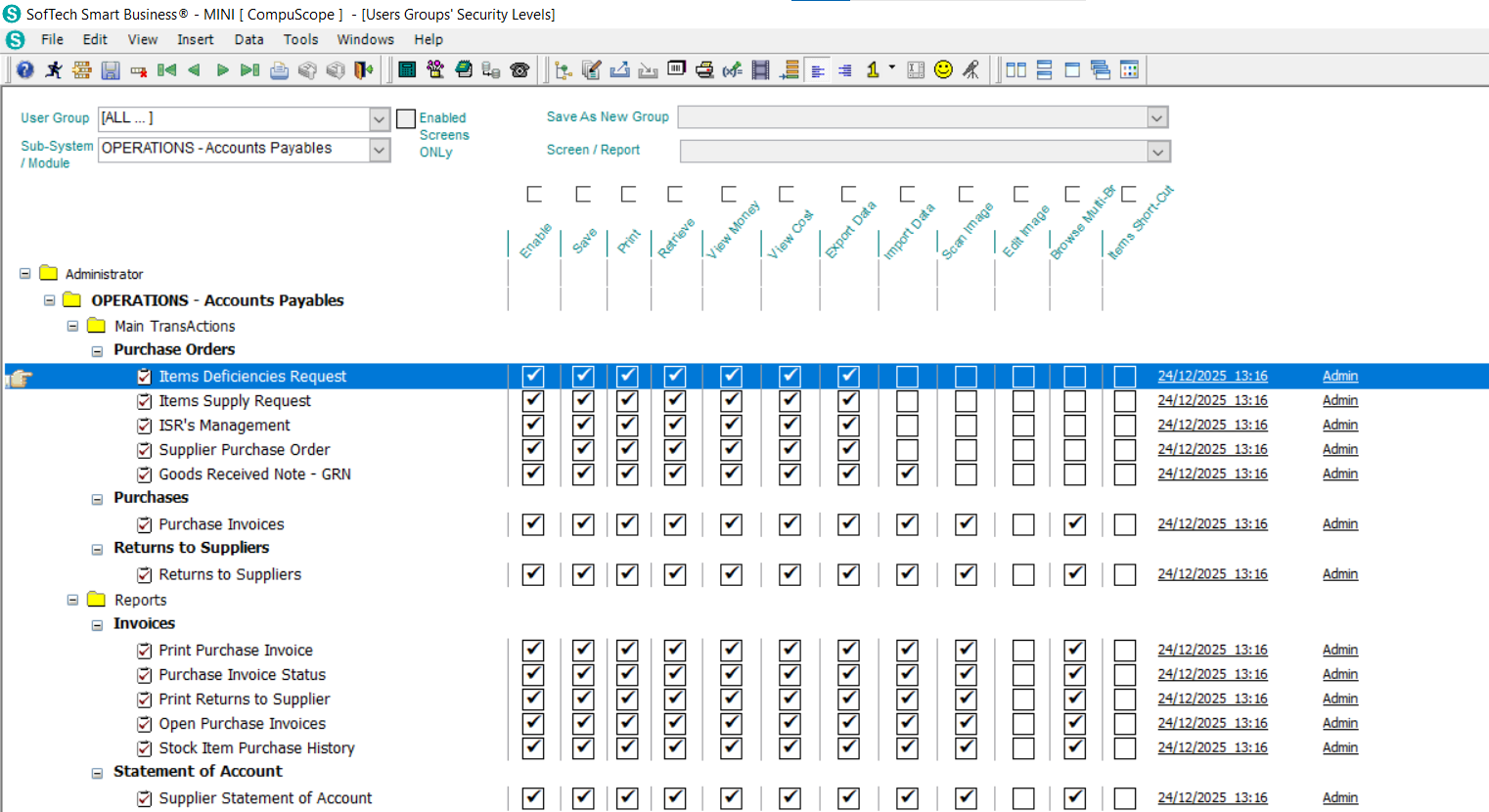
Defining user security levels is the process of implementing Role-Based Access Control (RBAC) within your ERP system to ensure that employees can only access the data and modules necessary for their specific job functions. In SofTech Smart Business, this is managed through the System Admin Module, where administrators create "User Groups" (such as Owners, Managers, or Cashiers) and assign specific granular permissions to each group. This structure allows businesses to delegate operational tasks with confidence, protecting sensitive financial data and preventing the unauthorized modification of system records.
With modern ERP systems, security is no longer just about passwords; it's about defining the boundaries of digital responsibility.
The Hidden Cost of "Open-Access" Systems
Many small-to-mid-sized businesses in Egypt make the mistake of giving all employees full system access to "save time." However, this practice is a significant driver of operational loss. According to the Association of Certified Fraud Examiners (ACFE), organizations lose an estimated 5% of their annual revenue to fraud, with a lack of internal controls—including ERP permission gaps—being the primary contributor.
"Security isn't about lack of trust; it's about creating a focused environment where every employee has exactly what they need to succeed, and nothing more," notes a lead implementation consultant at CompuScope.
Furthermore, research indicates that businesses with strict access controls experience 40% fewer data-related errors, as employees are not distracted by complex screens and reports irrelevant to their roles.
The Power of User Groups: Administrative Command
Instead of setting up rules for every single person individually—which is a massive administrative headache—SofTech utilizes User Groups. Think of these like "Security Profiles" that you can apply to any new hire instantly.
The Owners Level
Unrestricted access to all modules, financial reporting, and system settings.
The HRM Level
Access to employee files and payroll, with no visibility into inventory or sales.
The Cashier Level
Restricted to POS operations, with no access to total profit or back-office reports.
The Call Center Level
Customer info and order entry only, protecting the company's financial core.
Total Control: Manager vs. Cashier Dynamics
A real-world example of this protection is the split between sales and reporting. While a manager needs to see the "big picture" (profit margins, seasonal trends, and total store performance), a cashier's focus should be purely on transaction accuracy and speed.
In SofTech, you can configure a cashier's login so that the Sales Module is the only visible icon. Even within that module, critical functions like "Price Overrides" or "Refunds" can be locked, requiring a manager's override code—a simple yet effective layer of loss prevention.
FAQ
Conclusion
Effective security is the foundation of any scalable business. By leveraging the advanced security level features in SofTech Smart Business, you move beyond simple management to true digital governance. With CompuScope as your partner, you're not just buying software; you're buying the ability to delegate with confidence.
Need help auditing your ERP security levels? Contact CompuScope support for a professional consultation.