
Track Item movement across all branches
Last Updated:
Key Takeaways
- End-to-End Visibility: Eliminate "ghost inventory" by tracking goods through a dedicated "In-Transit" status.
- Inventory Shrinkage Reduction: Automated transfer workflows can reduce administrative errors by up to 30%.
- Aging Alerts: The 5-day red-flag system ensures shipments don't vanish in the supply chain.
- Demand-Driven Stocking: ISR fulfillment ensures branches are stocked based on real-time needs, not guesswork.
How to Track Item Movement Across Multi-Branch Organizations
Tracking item movement across multiple branches requires a centralized ERP system that provides real-time visibility into the "In-Transit" phase of logistics. In SofTech Smart Business, this is achieved through an automated workflow that connects Central Headquarters (HQ) with individual branches. When items leave HQ, they are moved into an "Exchange Between Branches" status, ensuring they remain on the company's books while physically in transit. By utilizing PO-to-Transfer integration and Item Supply Requests (ISR), businesses can eliminate manual data entry errors and maintain 100% accountability for every SKU from the moment it leaves the warehouse until it is scanned into branch inventory.
This level of governance is critical for preventing inventory shrinkage, which accounts for significant retail losses globally.
The Challenge of "Black Box" Logistics
For many multi-branch organizations in Egypt, the greatest challenge isn't the sale—it's the movement. According to retail logistics benchmarks, inventory shrinkage costs retailers nearly 1.6% of their bottom line annually, with a significant portion occurring during inter-branch transfers and unrecorded movements.
"Inventory sitting in a truck or a backroom is capital that isn't working. If you can't see it in your ERP, you can't manage it," says a senior logistics implementation expert at CompuScope.
Research shows that businesses implementing automated transfer tracking see a 25% improvement in stock availability and a 15% reduction in carrying costs within the first year.
1. The "One-Click" Automation Workflow
The power of a mature ERP is seen in how much manual work it eliminates. SofTech connects the procurement cycle directly to the transfer cycle.
PO-to-Transfer Integration
Raised a Purchase Order specifically for a new branch? One click imports that data into a transfer list, ensuring the physical shipment matches the procurement intent perfectly.
ISR Fulfillment
Branches shouldn't wait for stock; they should request it. HQ can instantly convert an Item Supply Request into a transfer order, fulfilling demand based on actual branch requirements.
2. The "Red Flag" System: 5-Day Accountability
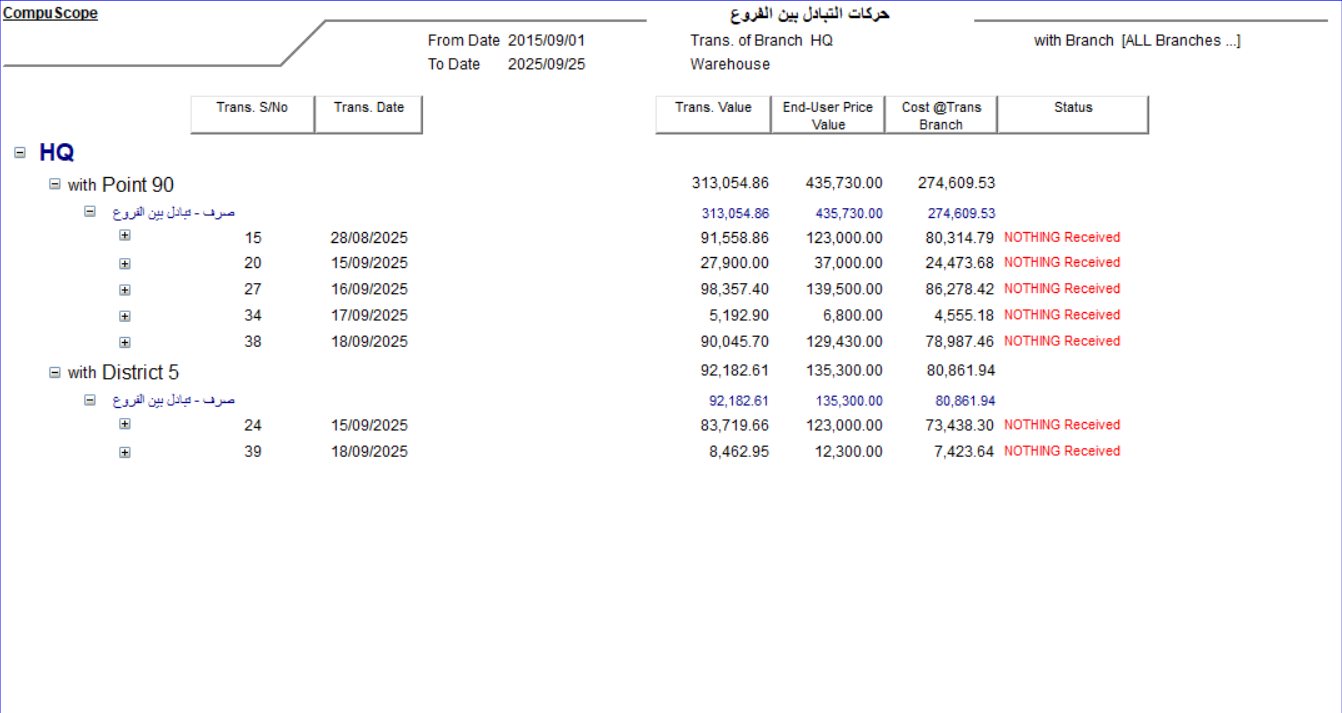
The most critical feature for loss prevention is SofTech's Aging Tracker. Inventory in transit is vulnerable. In SofTech, if a shipment remains in the "Exchange Between Branches" status for longer than 5 days, the system automatically highlights the entry in red.
This "Red Flag" system forces immediate investigation:
- Was the shipment delayed by the courier?
- Is the receiving branch failing to scan incoming goods?
- Is there a discrepancy between sent and received quantities?
FAQ
Conclusion
Managing a multi-branch organization requires more than just moving boxes; it requires digital governance. By automating the link between requests, orders, and transit, SofTech Smart Business allows you to scale from 10 branches to 100 without increasing your administrative headcount or losing control of your assets.
CompuScope has helped over 500 Egyptian chains optimize their logistics. Contact us for a workflow audit today.